A few months ago, I picked up my phone to record a video and suddenly received the message that almost every smartphone user hates. Storage almost full. The annoying thing was that I did not even understand where all my storage had gone. I had some photos, a few apps, and normal daily files. Nothing looked big enough to fill the entire phone. My first thought was simple, I should start deleting old photos.
But when I opened my gallery, I realized most of those pictures were memories I actually wanted to keep. So instead of randomly deleting things, I decided to check what was really taking space. Surprisingly, there were many things I could remove without touching my important files.
The First Place I Checked Was Not My Gallery
Most people open the gallery first when storage becomes full. I used to do the same. But photos are not always the biggest reason. When I opened my phone storage settings, I found different categories showing where space was being used. There were apps, downloads, videos, and some files I had completely forgotten about. That small check gave me a better idea. Instead of guessing, I knew where to start.
Old Downloads Were Just Sitting There
The downloads folder was honestly one of the biggest surprises. There were files I downloaded for a small task and never opened again. Old PDFs. Random images. Documents I needed only once.
The funny thing is, we usually forget these files exist because they do not appear in the gallery. I removed the files I clearly did not need and kept anything important. It was a simple cleanup, but it recovered space without losing anything valuable.
A Few Videos Took More Space Than Hundreds Of Photos
Earlier, I always blamed photos for storage problems. Later, I noticed videos were usually the bigger reason. Modern phones record better quality videos, but those files are also much larger. A few long videos can quietly take several GB of storage. Now whenever my storage gets low, I check large videos first.
Many times there are:
- Screen recordings I forgot about.
- Duplicate clips.
- Videos sent by others.
Deleting a few unnecessary videos works better than removing hundreds of photos.
Messaging Apps Collect More Than You Think
This was probably the biggest hidden storage problem for me.
Every day, people send different things:
- Pictures
- Short Clips
- Documents
- Voice Messages
Individually, these files look small. But after months, they become a huge collection. When I checked my messaging folders, there were many files that were not important anymore. I did not delete everything. I only removed forwarded files and things I knew I would never need. Important photos and conversations stayed safe.
Moving Files Is Better Than Deleting Everything
One mistake I made before was thinking that free storage means deleting files. That is not always true. Some files are important, but they do not need to stay inside your phone forever. For example, old family videos or documents can be moved somewhere safer. A laptop, external drive, or cloud storage can help. Your phone should mainly keep the things you use regularly.
Screenshots Can Become A Mess
This is a small thing, but I noticed my screenshots folder was full of random stuff. Most screenshots are useful for a short time. A payment screenshot. Something you wanted to remember. A picture from a website. After a few months, many of them become useless. Cleaning screenshots is easier because they usually do not have the same emotional value as normal photos.
App Data Also Grows Slowly
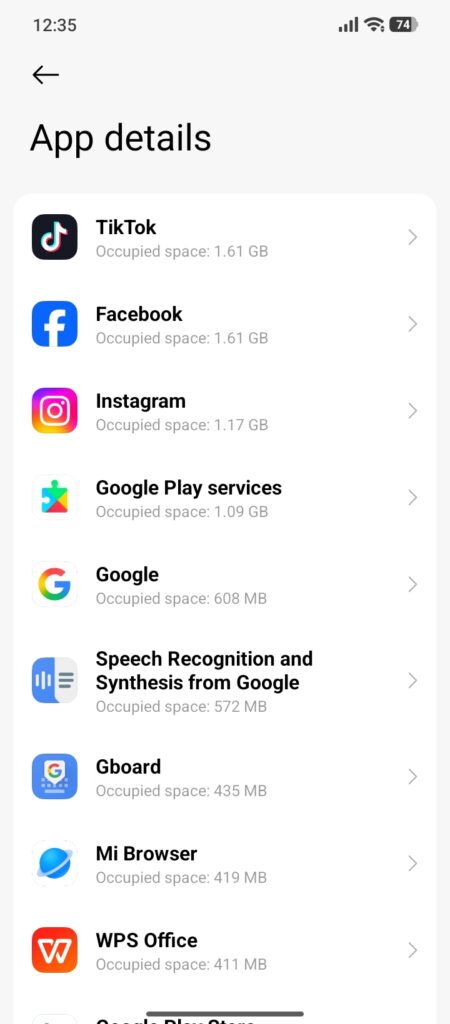
Apps do not always stay the same size. An app you installed months ago may store more data over time. This does not mean every app is bad. It is normal. But checking which apps are taking the most storage can help. Sometimes you find an app you barely use taking a lot of space. Those are the easiest decisions.
I Avoid Random Cleaning Apps
A few years ago, I used to think installing cleaner apps was necessary. Now I usually avoid them. Most Android phones already have enough options to manage storage. Adding another app just to remove files is not always needed. Understanding your own storage is more useful.
What I Do Now To Avoid Storage Problems
I do not clean my phone every day. That becomes annoying. I just check things occasionally.
Usually I look at:
- Large Videos
- Downloads
- Screenshorts
- Unused Files
It takes a few minutes and keeps storage under control.
Final Thoughts
When your phone storage becomes full, do not immediately start deleting your favorite photos. Most phones collect a lot of unnecessary things over time. Old downloads, forgotten videos, screenshots, and unused files slowly take up space without you noticing. Checking these areas first can free up storage while keeping your important memories safe. A little cleanup from time to time is usually enough to keep your phone organized.