I think almost every smartphone user faces this problem at some point. Your phone works perfectly fine for months, and then suddenly you start feeling that the battery is not lasting like before.
The same thing happened with me. My phone was not very old, but I noticed that I was charging it more often than usual. Earlier, one full charge was enough for my normal daily use, but later I had to connect the charger again before the end of the day.
At first, I thought the battery itself was damaged. Most of us think the same whenever battery timing gets worse. But after checking different settings and changing a few habits, I realized the problem is not always the battery.
Sometimes your phone is simply doing too many things in the background without you noticing. Here are some common reasons that can make your phone battery drain faster, and the practical changes that may help.
Check Which Apps Are Actually Using Your Battery
Before changing random settings, the first thing worth checking is battery usage. Many people install apps and forget about them. The problem is some of these apps continue working even when you are not opening them. I found a few apps on my phone that I rarely used, but they were still appearing in the battery usage list.
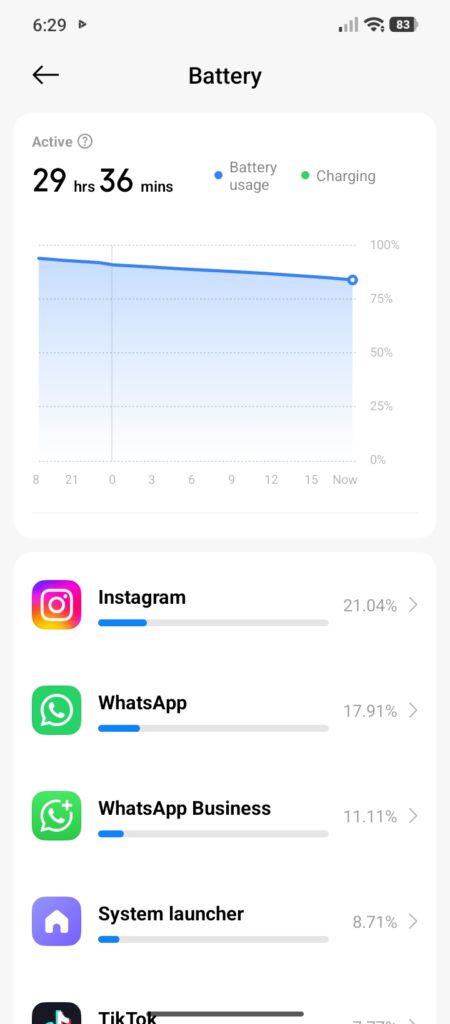
You can check this from:
Settings → Battery → Battery Usage
The exact option can be slightly different depending on your phone model. Look for apps that are using more battery than expected. If an app is important, you can limit its background activity instead of deleting it. For apps you do not use anymore, removing them is usually the better option.
Your Screen Settings Matter More Than You Think
Most people blame apps first, but the display itself uses a lot of battery. Keeping brightness high all day looks good, especially outdoors, but it can reduce battery timing quickly. I used to keep brightness higher than needed because it felt more comfortable. After using automatic brightness and reducing screen timeout, I noticed the phone lasted longer.
A few settings worth changing:
- Use auto brightness
- Reduce screen timeout
- Avoid always keeping maximum brightness
These changes look small, but when your screen stays active for hours every day, they make a difference.
Mobile Data Can Reduce Battery Faster
This is something many users ignore. Using mobile data usually consumes more battery compared to a stable WiFi connection. Your phone constantly communicates with network towers. If the signal is weak, it works harder to maintain the connection.
I have noticed this especially while travelling. The same phone battery that lasts longer at home can drop faster outside because signals keep changing. If you are somewhere with very poor coverage, your phone may lose battery even when you are barely using it.
Turn Off Things You Are Not Using
Modern phones have many features running together:
- Bluetooth
- GPS
- Hotspot
- Background syncing
Obviously, these features are useful, but they do not need to stay active all the time. For example, many people turn on hotspot for another device and forget to disable it later. The same happens with location services.
Instead of completely turning everything off, a better approach is controlling which apps really need access. Check your location permissions and allow location only for apps where it makes sense.
Too Many Notifications Also Affect Battery
Notifications look simple, but your phone wakes up every time an app sends one. The screen turns on, internet activity happens, and the app refreshes information. One notification does not matter. Hundreds of unnecessary notifications every week can have an impact.
I usually turn off notifications from:
- Shopping Apps
- Unused Games
- Random Promotional Apps
Important apps can stay enabled. This also makes the phone less distracting.
Avoid Extreme Charging Habits
Battery technology has improved a lot, but charging habits still matter. You do not need to worry about every single percentage, but some habits are not helpful.
For example:
- Leaving the phone in very hot places.
- Using poor-quality chargers.
- Letting the phone heat too much regularly.
Heat is one of the biggest enemies of smartphone batteries. If your phone becomes extremely hot while charging, remove the case for some time or keep it in a cooler place.
Keep Your Phone Updated
Sometimes battery problems are not because of your usage. A software bug or poorly optimized app update can also create battery issues. Keeping apps and system software updated can solve these problems. Restarting your phone occasionally can also help because it closes stuck background processes. Many people keep their phones running for weeks without a single restart.
When The Battery Itself Is The Problem
Settings cannot fix everything. If your phone is old and the battery has completed many charging cycles, naturally it will not perform like a new battery.
Common signs of an aging battery:
- sudden percentage drops
- phone turning off unexpectedly
- very fast charging and draining
In this situation, replacing the battery may make more sense than changing hundreds of settings.
Final Thoughts
Fast battery drain does not always mean you need a new phone. Before spending money, spend some time checking what is actually happening inside your device. In many cases, small changes like controlling background apps, adjusting brightness, managing mobile data, and improving charging habits can make your phone last longer.
Every phone and user is different, so there is no single magic setting. Try a few changes, observe your battery for a few days, and keep the settings that actually work for your daily routine.